The CodeRabbit CLI helps teams run AI code reviews from the terminal or coding agents. CLI 0.7.1 makes those local and agent-driven reviews faster, more reliable, and easier to configure. It also introduces an agent-native way to install CodeRabbit Skills.
If you already use the CLI, this is an upgrade worth making. Reviews finish sooner, and long-running sessions stay connected more reliably. The CLI can now catch configuration problems before a review begins.
Improved review performance and reliability
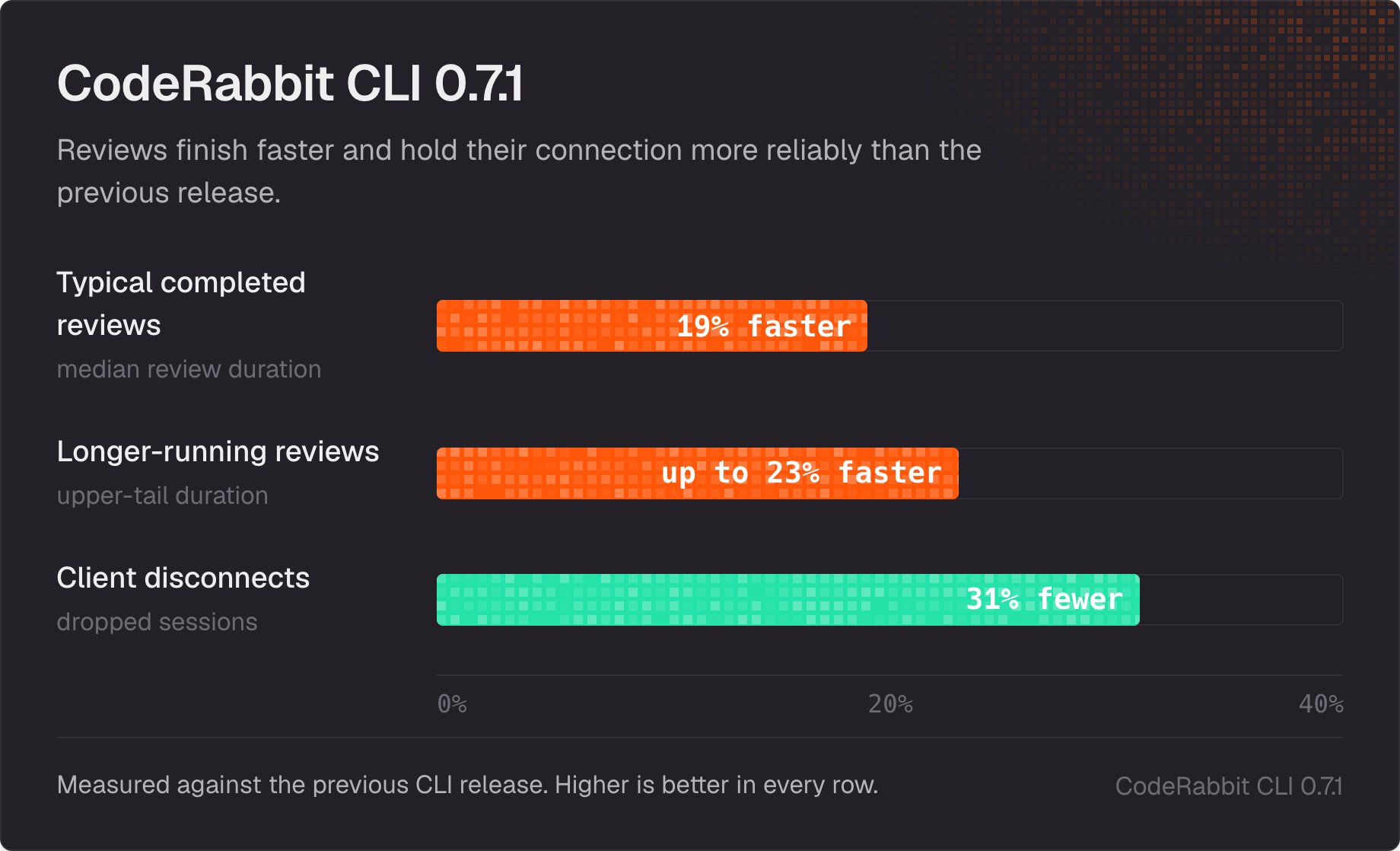
Based on recent review telemetry, the latest performance work reduced wait times across routine and longer-running reviews. Typical completed reviews finished 19% faster, while longer-running reviews improved by up to 23%. Client disconnects fell 31%, helping more reviews stay active through longer periods of model work and repository analysis. Results vary by repository and review size.
Long reviews can appear quiet while models, tools, and repository analysis are still working. The CLI now sends keepalive traffic during those stretches and gives longer sessions more time to finish. If a client disconnects, queued work stops and the outcome is recorded as a skip instead of a runtime failure.
New configuration validation
coderabbit config validate catches configuration problems before a review starts. By default, it checks .coderabbit.yaml or .coderabbit.yml in the repository root for valid YAML and compares the file against the current official schema. Errors point to the relevant line.
The command returns a nonzero exit code when validation fails, so you can use the same check locally or in CI. You can also point it at a specific file:
coderabbit config validate path/to/config.yamlImproved agent workflows
Coding agents can now start reviews with less manual authentication and keep useful output when a run is interrupted. These changes make the CLI easier to use inside automated and agent-driven workflows, especially when a review is launched from an agent session instead of directly from a terminal.
- CodeRabbit-managed agent workflows can use a temporary review capability created for the current task instead of requiring an interactive sign-in or shared API key.
- When login is required, the CLI uses a localhost browser callback. Unsupported environments return control to the user with
coderabbit auth login. - Agent-driven reviews preserve the final CLI output. An interrupted run returns the work completed so far as a partial result.
Authentication fixes also cover selected self-managed GitLab organizations beyond the initial discovery cap. Verified paid GitHub sessions now receive the correct access guidance when usage-based reviews are enabled.
New Skills integration for coding agents
CodeRabbit Skills is the most direct path in this release to agent-native review workflows. It connects CodeRabbit to Codex, Claude Code, Cursor, Gemini CLI, and GitHub Copilot. Run coderabbit skills to preview and install or update verified Skills for the supported agents detected on your machine.
coderabbit skills detecting installed agents and walking through the Skills installation.Once installed, a coding agent can start a review from a request such as "Run a CodeRabbit review" without you explaining which CLI command to use. This gives teams another integration path alongside plugins and direct CLI commands. The installer shows the exact changes and asks for confirmation before writing files. Locally modified Skills, package-runner Skills, and plugin-managed Skills are left unchanged.
See the CodeRabbit Skills documentation for installation details and examples.
Simplified CLI commands and review scope
The release also reduces the setup needed for everyday reviews:
- Running
crstarts a review of tracked changes by default. Use--committed,--uncommitted, or--include-untrackedto change the scope. - When a review contains too many files, the CLI shows the current count and limit, then suggests smaller scopes with estimated file counts.
- Account-loading errors now distinguish HTTP, timeout, TLS, DNS, and connection problems, with recovery guidance when available.
--lightreplaces--fast, and--dirreplaces--cwd. The default output replaces the older--plainand--interactiveflags. Use--agentfor agent-oriented output.
Install or update CodeRabbit CLI
Read the CLI documentation for setup and command options. Current limits and usage options are documented on the CodeRabbit plans page.
If you have not installed the CLI, follow the installation guide and run cr for your first local review. Existing users should update to 0.7.1 and confirm the version with coderabbit --version. To bring the same improvements into your agent workflow, run coderabbit skills or ask your preferred coding agent to update the CLI for you.
— Hendrik