"All you need is a good prompt"
An agent is a model plus a harness — and almost everything people argue about when they argue about agents is really an argument about the harness. This post is about what goes inside that wrapper, explained through the agent I keep rebuilding: a code reviewer.
The counter-position is popular and worth taking seriously: models are so good now, maybe all you need is a good prompt. Exhibit A is obra/superpowers — 178k stars, and its code-review agent is a single 146-line markdown file. Review the change, compare against the plan, check quality, categorize by severity. Two git diff commands and off you go.
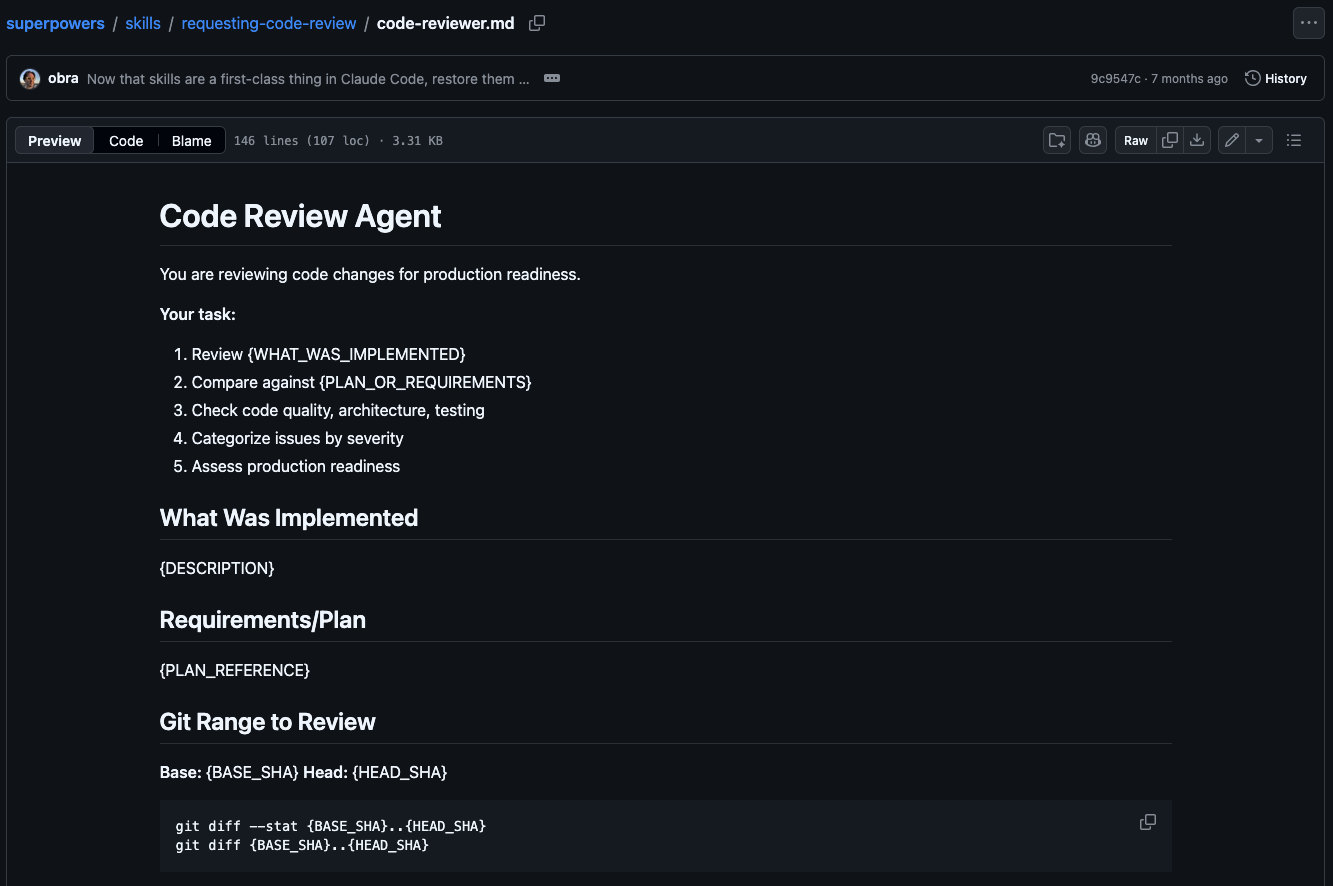
And for a lot of PRs it genuinely works. The model is doing the heavy lifting; the prompt just points it. So why bother building anything more?
Bugs live outside the diff
Because the diff is the wrong unit of review. Many of the bugs worth catching don't live in the lines that turned red and green — they live one call away. A function inside the diff grows a new raise ValueError; every caller up the graph was written before that exception existed, and none of them handle it. The diff looks clean. The caller breaks silently in production.
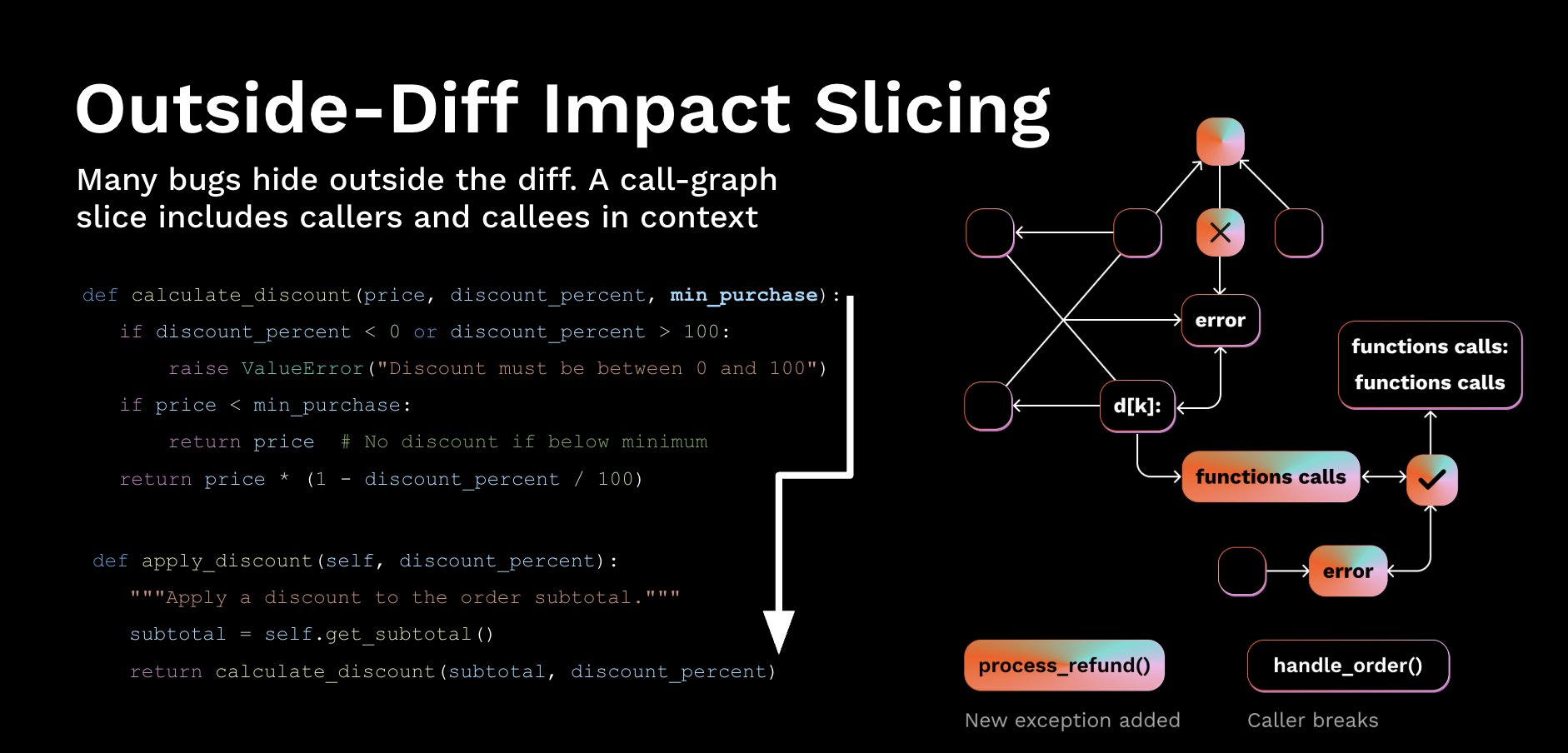
A useful review therefore needs the call-graph slice — every caller and callee touched by the change — pulled into context alongside the diff. That's not something a prompt can ask for; it's something the system around the model has to compute and serve. This is the first job of the harness: deciding what the model gets to see.
Receipts: same model, three harnesses
Let me prove it instead of asserting it. Same task, same model, same prompt — the only thing that changes is the harness around it. Three modes: diff-only (the superpowers approach), all-code (dump the whole repo into context), and smart (the call-graph slice plus targeted retrieval).
$ python benchmark.py --bug-fixture pr-2841

Mode         Bug Found?   Input Tokens   Time (s)
--------------------------------------------------
diff-only    No           390            4.85
all-code     No           10,586         5.60
smart        Yes          1,041          2.60
--------------------------------------------------

SUMMARY:
- Smart mode uses 90.2% fewer tokens than all-code mode.
- Smart mode is the only mode that finds the bug.
Diff-only misses the bug — the breakage isn't in the diff. All-code buries it: ten times the tokens, and the model loses the signal in the noise. Smart mode finds it at a tenth of the cost, in half the time. A harness that picks the right context, runs the right tool, and stops isn't an optimization on top of the model — it's the difference between finding the bug and not.
Work backwards from a senior SWE
So how do you decide what goes in the harness? The method that has served me best: ask what a senior engineer needs to do a good review, then work backwards. Every harness primitive should derive from something the model can't deliver on its own — and nothing else. Don't over-complicate it.
| What the senior SWE needs | Agent design primitive |
|---|---|
| Access to the codebase | Computer + sandbox — a filesystem in an isolated environment |
| Read & write code, run scripts | Bash + code execution — one general-purpose action surface |
| Tools for the job — tests, linters | Curated tools + MCP — small, sharp, targeted |
| Context: the codebase and the job to be done | Skills, learnings & memory — context engineering |
That gives the harness its shape: the core is the model. The inner ring is the computer you hand it — filesystem, shell, sandbox, a dozen curated tools. The outer ring is everything layered on top to keep long work coherent: context engineering, orchestration, learning. Twelve primitives total; the checklist at the end walks all of them.
The reviewer, end to end
Here's how the actual reviewer runs, from PR webhook to posted review. Two phases: build a context-rich prompt up front, then hand it to a model that drives a small toolkit until it submits findings.
Phase 1 — build the context before the loop. Clone the PR and diff base..head. Slice the changed AST units — function, method, module — with ast-grep. Embed each chunk with voyage-code-3, run semantic search against a per-repo Qdrant collection of past learnings, and pass every hit through a cheap per-hit applicability filter (Haiku 4.5 answering yes/no). What survives gets merged into the prompt: <past_learnings> + diff + task.
Phase 2 — the agent loop. Opus 4.7 drives, effort maxed, capped at 100 turns. It reads the prompt, thinks, picks the next tool through an in-process MCP server, and decides when to stop. The toolkit is deliberately small: bash (cwd-locked), read_file_section, ast_search, grep, search_learnings, build_review_context for the outside-diff slice, and submit_findings to exit the loop. Every call hits the cloned repo through the same sandbox boundary with 15-second timeouts — a host tempdir locally, a Daytona cloud sandbox in production. Skills like ast_grep.md load on demand rather than sitting in the system prompt.
The findings land on GitHub as one atomic POST — N inline comments plus a summary body. Nothing duplicated, nothing lost.
Two SDKs, same model
I built this harness twice: once on the Client SDK, once on the Agent SDK. Both call Opus 4.7 through the same Anthropic API, with the same tools and the same prompt. The only thing that changes is who owns the loop.
With the Client SDK you drive every turn — the while loop, parsing tool_use blocks, dispatching tool functions, building tool_result messages, placing prompt-cache breakpoints, deciding when to stop. Full control, ~300 lines of plumbing:
# we own the loop
messages = [{"role": "user", "content": prompt}]
while num_turns < MAX_TURNS:
    response = client.messages.create(
        model=MODEL, tools=ALL_TOOLS,
        system=SYSTEM, messages=messages,
        output_config={"effort": effort},
    )
    if response.stop_reason != "tool_use":
        break
    for block in response.content:
        if block.type == "tool_use":
            result = _dispatch(block.name, block.input)
            messages.append(_tool_result(result))
With the Agent SDK you declare tools and let the SDK run the loop — dispatch, cache breakpoints, stop conditions all handled. Same behavior, ~80 lines of glue:
@tool("read_file_section", "Read N lines", {...})
async def read_file_section(args): ...
# (six more @tool decorators)

server = create_sdk_mcp_server(
    name="reviewer",
    tools=[read_file_section, ...],
)
options = ClaudeAgentOptions(
    model=MODEL, system_prompt=SYSTEM,
    mcp_servers={"reviewer": server},
    allowed_tools=["mcp__reviewer__*", ...],
    max_turns=MAX_TURNS, effort=effort,
)
async for msg in query(prompt, options):
    log(msg)  # SDK runs the loop
The result that surprised me: on my benchmark the Agent SDK version came out 2× cheaper per caught bug at the same recall — mostly because the SDK places prompt-cache breakpoints better than my hand-rolled loop did. Reach for the Client SDK when you need to own the loop — custom dispatch, exotic caching, weird stop conditions. Reach for the Agent SDK when you'd rather own the tools and let someone else own the plumbing. Choosing your SDK is choosing your unit economics.
The twelve-primitive checklist
Everything above generalizes past code review. An effective harness has all twelve of these — grouped by the layer they live in:
| # | Primitive | What it buys you | Layer |
|---|---|---|---|
| 01 | Filesystem | Durable workspace that outlives the context window; offload target; with git, a shared ledger | computer |
| 02 | Bash + code | One general-purpose tool the agent uses to author all the others | computer |
| 03 | Sandbox | Isolated, allow-listed runtime with runtimes and test runners pre-loaded | computer |
| 04 | Curated tools | ≈ a dozen atomic tools, not a hundred — every definition costs tokens | computer |
| 05 | Progressive disclosure | Surface metadata only; load full detail on demand via skills and indexes | context |
| 06 | Offload & compact | Old tool output to disk; summarize only at diminishing returns, never before | context |
| 07 | Prompt cache | Stable prefixes. Cache hit rate is the production cost metric | context |
| 08 | Sub-agents | Isolated context windows for parallel work and clean handoffs | orchestration |
| 09 | Ralph loop + hooks | Reinject the goal into a clean window; state lives on disk | orchestration |
| 10 | Plan & verify | Decompose, write it down, run tests as stop-hooks. No verification, no progress | orchestration |
| 11 | Memory | AGENTS.md-style files, auto-loaded on start, edited by the agent as it learns | learning |
| 12 | Evolve | Reflect over old runs; distill what worked into new skills, prompts, memories | learning |
The pattern behind all twelve: each primitive exists because a senior engineer needs it and the model can't deliver it on its own. If you can't name the behavior a primitive buys you, leave it out.
Build your own, this afternoon
Everything here is open and reproducible: the benchmark, the eval harness, and the reviewer itself live at github.com/Hendrik040/ai-code-reviewer. The methodology is also packaged as a Claude Code plugin — install it and Claude walks you through building, evaluating, and iterating on a benchmark of your own:
$ claude plugin marketplace add ant-open-skills/custom-model-bench
$ claude plugin install custom-model-bench@ant-open-skills
And if you want to talk through the why behind any choice in this harness — or how to build one for your team — my DMs are open on LinkedIn and X.
— Hendrik